
1. Understand what WordPress caching actually changes
A fast WordPress website has two jobs: produce the correct information and deliver it without unnecessary work. Caching helps with the second job by reusing something already calculated. It must never compromise the first. A contact page can usually share the same HTML between visitors; a customer's account, shopping cart or negotiated price cannot. Start by identifying which parts of your site are public, which change frequently and which belong to one particular visitor.
This guide follows WP Rocket's current 3.23 interface, checked on 9 October 2026. Version 3.23.5.1 is the latest release listed at that date. Settings can move, compatibility rules can change and hosting integrations can hide options. Compare your installed version with the official changelog before applying instructions. The configurations below are starting points to test, not a promise that every checkbox suits every website.
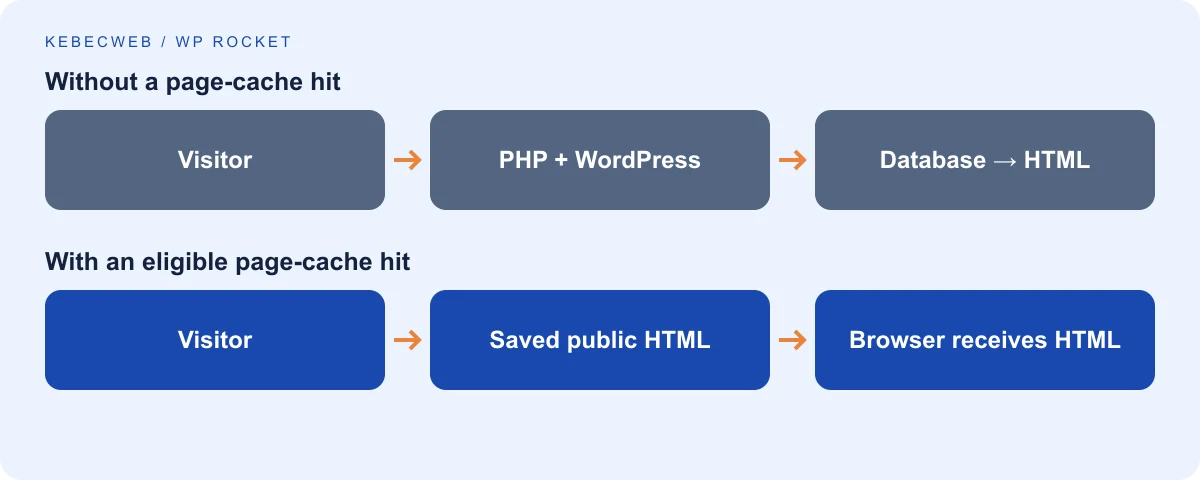
The request without a page cache
When someone opens a WordPress page, the web server receives the request and normally starts PHP. WordPress loads its configuration, active plugins and theme. It reads options and content from the database, evaluates permissions, builds menus and assembles the response. PHP then returns HTML. The browser still has to download stylesheets, scripts, fonts and images before it can display and operate the page.
Some of this work is necessary. Checking stock and recording a payment must happen against current application data. Rebuilding an unchanged public article for each anonymous reader is often unnecessary. Under a traffic spike, repeated page generation occupies PHP workers and database connections. Requests begin waiting even when the actual calculation is relatively short. That queue is one reason a site can feel fast during a quiet test and slow during a campaign.
The request with a page cache
A page cache saves a generated HTML response for eligible requests. When a matching visitor requests that URL again, the cached response can be served without rebuilding the entire page. A cache hit means a suitable saved version was found. A cache miss means the application must generate one, provided the request is eligible. A bypass means the request deliberately avoids the shared cache because of authentication, cookies, method, path or another rule.
“Matching” matters. A mobile version, language, currency or query parameter may represent a different response. If the cache ignores a distinction that the application relies on, it can return the wrong information. Conversely, creating a separate cache for every tracking parameter can waste storage and reduce the hit rate. Good configuration defines which differences change the content and which merely describe where the visitor came from.
Page cache and browser cache are different
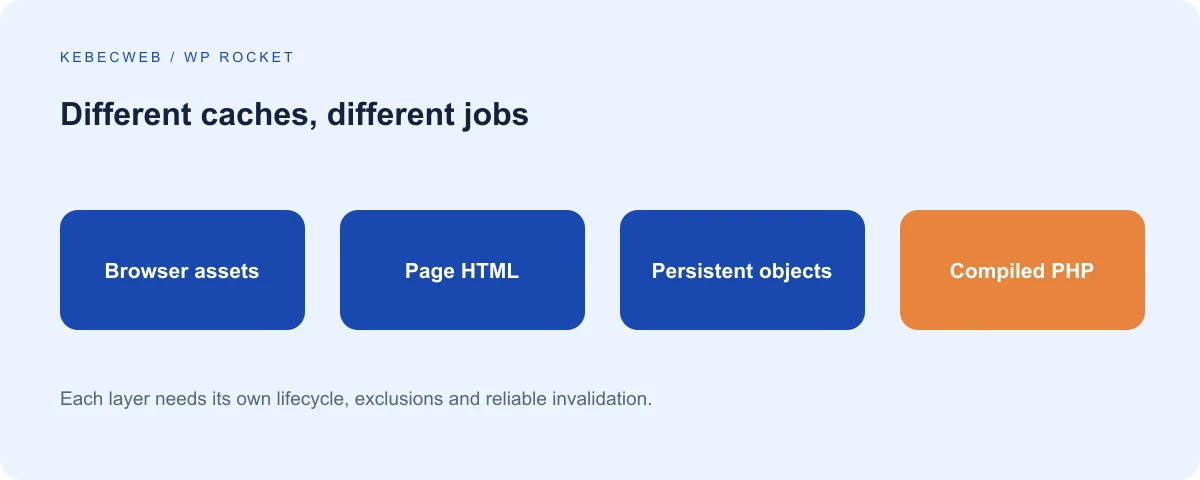
The page cache lives at the application, server or edge. Browser caching stores resources on the visitor's own device according to HTTP headers. A returning visitor may reuse a logo or stylesheet without downloading it again. That does not mean a first-time visitor receives cached HTML, and a fast second visit is not enough to prove the page cache works.
Versioned asset URLs help browsers distinguish old and new resources. If you change a stylesheet but keep a long-lived URL with no version change, visitors may retain the old design. Clearing WP Rocket's page cache does not directly erase copies inside everyone's browser. Test in a fresh browser profile and inspect the resource URLs rather than asking all visitors to refresh repeatedly.
Object caching, Redis and Memcached
WordPress also caches objects: query results, options and other reusable pieces of data. Its default object cache is generally limited to the current request. A persistent backend such as Redis or Memcached can retain suitable objects across requests. This helps pages that still need PHP, including some administration and commerce operations, by reducing repeated database work.
An object cache is not a substitute for correct application logic. Extensions must invalidate their objects when data changes. It also requires an available service, a compatible integration and safe isolation between sites. Do not install a Redis plugin and assume a Redis server exists. Ask the hosting team about availability, authentication, memory limits, eviction policy and the right database or key prefix. WP Rocket does not provision Redis or Memcached for you.
PHP OPcache
PHP normally converts source files into executable instructions before running them. OPcache retains those compiled instructions so subsequent requests do less compilation work. It does not store the finished WordPress page and does not freeze a customer's cart. It can improve uncached requests, whereas a page cache may avoid PHP altogether.
OPcache is a server setting, not a WP Rocket checkbox. Its usefulness depends on configuration, capacity and the number of PHP files being loaded. A developer should investigate capacity, invalidation and deployment behaviour rather than blindly disabling timestamp checks. PHP updates, file deployments and process restarts need an established operational procedure so fresh code is actually used.
Server caches and edge caches
A hosting platform may use a reverse proxy or a web-server cache ahead of WordPress. A CDN normally keeps assets closer to visitors; some CDN products additionally cache HTML. These layers can coexist with WP Rocket, but each needs compatible exclusions and purging. Some hosting integrations intentionally disable WP Rocket's own page cache while retaining its other optimizations. An empty WP Rocket cache directory is therefore not automatically a failure.
| Layer | Reuses | Main benefit | What it cannot replace |
|---|---|---|---|
| Browser | Previously downloaded resources | Faster repeat visits | First-visit server performance |
| Page cache | Eligible generated HTML | Less PHP and database work | Private account processing |
| Object cache | Reusable application data | Faster dynamic operations | Correct invalidation and queries |
| OPcache | Compiled PHP instructions | Less compilation overhead | Efficient application code |
| CDN or edge | Assets and, when configured, HTML | Shorter delivery distance | Safe session and cookie rules |
Expiration, purging and warming
Expiration limits how long a saved response remains usable. Purging removes a response before its normal expiry because something changed. Preloading makes an automated visit to generate an eligible response before a customer arrives. Warming describes the broader process of preparing caches and generated resources. These are related operations, but they are not interchangeable.
A site that purges everything every few minutes may spend its time rebuilding rather than serving hits. A site that never purges may display stale content. Prefer targeted invalidation when supported: updating a post should refresh that post and relevant archives; updating a shared promotion may require additional pages. Record those dependencies before choosing a very long lifespan.
A cached HTML response can reduce CPU consumption and database queries, but cache files use storage and preloading still consumes resources. Object caches use RAM. More RAM is useful only when allocated to a real workload; a large PHP memory ceiling does not make every page faster. Start with WordPress performance basics and identify whether your delay comes from the server, network or browser before choosing a tool.
2. Decide whether WP Rocket fits your website
WP Rocket combines page caching with front-end optimization in a paid WordPress plugin. Its appeal is a relatively approachable interface, automatic compatibility work and a single place to manage several performance features. It is not an image editor, a security scanner, a database repair service or an automatic replacement for good hosting. A badly designed query still costs time when a page cannot be cached.
Licensing and installation source
Purchase and download through WP Rocket's official website. Check the current site allowance, renewal terms and support conditions in your account. Pricing and licence plans can change, so this guide does not quote a fixed subscription price. A licence for one site should not be assumed to cover unrelated production websites.
Keep the plugin up to date using a legitimate account. Avoid redistributed “nulled” copies: an unknown download undermines both update reliability and the security of your hosting account. Some features depend on external WP Rocket services and an active licence. A local cached page continuing to exist after expiry does not mean all cloud-dependent CSS processing or monitoring remains available.
Kebecweb hosting does not automatically include a WP Rocket licence or unlimited optimization work. If you want installation, diagnosis or configuration assistance, open a support request to confirm the appropriate service and scope. Never send your purchase password or licence credentials in a public form.
Compare approaches rather than labels
| Solution | Appropriate starting point | Important qualification |
|---|---|---|
| WP Rocket | A supported paid workflow combining caching and front-end tuning | Results depend on the site and hosting integration |
| LiteSpeed Cache | A site using a compatible LiteSpeed server cache or configured QUIC.cloud service | Its full page-cache capability depends on the stack; not every feature needs LiteSpeed |
| W3 Total Cache | An administrator comfortable choosing and maintaining several caching backends | More options create more configuration responsibility |
| WP Super Cache | A relatively focused static-page caching approach | Additional front-end optimization may require separate tools |
| Hosting-native cache | A platform with managed exclusions, purge integration and monitoring | Confirm what the host already handles before adding another page cache |
The relevant question is not which plugin has the longest feature list. It is which setup you can operate safely, measure consistently and keep compatible with your customers' actions. A LiteSpeed-native cache can be an excellent fit on the right server. A simpler static cache can be enough for a small publication. A managed platform may already provide the page-cache layer you need.
Consult the maintainers' information for LiteSpeed Cache, W3 Total Cache and WP Super Cache. Compare the same representative URLs under the same conditions. Do not keep two page-caching plugins active just to see whether their benefits add together; overlapping rewrite rules, drop-ins and purge behaviour make that experiment difficult to interpret.
Compatibility is a continuing process
Themes, builders, payment integrations and consent tools change. A combination that works today should be retested after a significant update. Automatic exclusions reduce configuration work but cannot recognize every custom widget or business rule. Keep a short inventory of your special behaviours: member-only pages, product configurators, currency switching, location-based pricing, live search and authenticated downloads.
Treat a builder's generated CSS as another cache layer. Regenerating that CSS, clearing WP Rocket and refreshing the CDN may all be necessary after a redesign. Decide which tool owns each task before enabling similar optimizations in multiple products. One clear owner for minification, one for HTML caching and one for image conversion is easier to troubleshoot than several competing implementations.
3. Install, activate and establish a safe baseline
Prepare a recoverable change
Before installation, create a backup containing the database and website files, and know how to restore it. A settings export is helpful but does not replace a backup. If you use a staging copy, protect its customer data, disable production payment processing and prevent test emails reaching real customers. Do not weaken authentication simply to let an optimization scanner access private content.
Record the WordPress, PHP, theme, builder, WooCommerce and optimization-plugin versions. Note any server cache and CDN. Run baseline tests on the homepage, an article, a complex landing page and, for a store, a product and checkout. Keep the conditions and date with your results. A baseline without its device, location and cache state is hard to compare later.
Install from the official ZIP
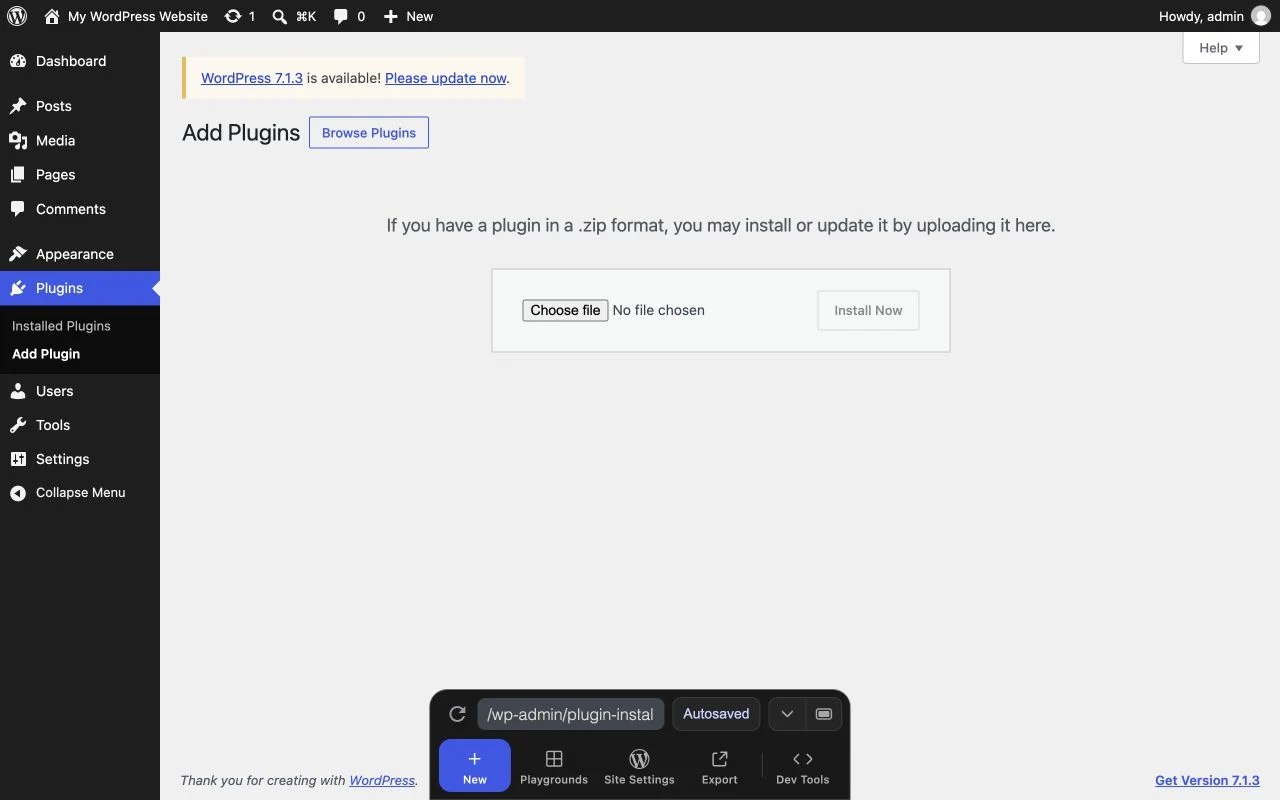
- Download the current plugin ZIP from your WP Rocket account. Keep it intact; WordPress expects an installable archive.
- Sign in to WordPress with an administrator account allowed to install plugins. On a multisite installation, installation and activation may require network-administrator access.
- Open Plugins → Add New Plugin → Upload Plugin. Labels differ slightly by WordPress language and version.
- Select the ZIP, choose Install Now, and wait for a successful installation message.
- Activate WP Rocket. Open Settings → WP Rocket and review the dashboard and any environment-specific notices.
- Visit the public website while logged out. Check the desktop navigation, mobile navigation, search and contact form before changing additional options.
If uploading fails, read the actual error: file-size limits, filesystem permissions, an incomplete archive and an existing installation are different problems. Do not rename random WordPress folders or make everything world-writable. Use the plugin-management guide or ask support for the specific failure.
Remove overlapping ownership carefully
Identify any active page-caching or optimization plugin before proceeding. Export its settings and check its removal instructions. Disable overlapping functionality, then clear the relevant caches. Some plugins leave a cache drop-in or rewrite rules behind, so an inactive dashboard entry is not conclusive evidence that the old layer is gone.
Keep unrelated image, SEO and security functionality unless there is a demonstrated conflict. If one plugin does multiple jobs, disable only the overlapping part when supported. Make these changes on staging first. A clean baseline is more useful than simultaneously replacing three plugins and changing the theme.
Confirm an eligible page is cached
Open a public, non-personalized page in a fresh logged-out session. Visit it again. Where WP Rocket's own page cache is active, inspect the website's wp-content/cache/wp-rocket/ directory using the hosting file manager or authorized SFTP access. Eligible pages should acquire cache files after a visit or preload. Do not delete other directories to make the test “clean.”
A source comment identifying WP Rocket can show that the plugin processed a response, but it is not proof that every request was a cache hit. Likewise, a short response time alone is not proof. Server integration, response headers and the cache file together give better evidence. Verify the host's cache indicators when WP Rocket intentionally delegates page caching to the server.
Test a second private session and a mobile browser. Compare actual content, not just timing. An administrator's view often bypasses public caching; never use that view as your only performance sample. A customer account should remain private even if the public article is cached.
Update without losing a known-good configuration
Export WP Rocket's settings before a significant update. Read the release notes, update on staging and test the same routes and interactions used during installation. Only then apply the update to production. After updating a builder or theme, regenerate its assets through its own supported tools and clear affected caches in the documented order.
A rollback is a short-term recovery measure, not a long-term maintenance strategy. Record the failing version and reproducible steps, restore the last safe behaviour, and investigate. If a release fixes a security issue, discuss the safest recovery path rather than leaving an old version indefinitely. See the official export, import and rollback instructions.
4. Configure the current WP Rocket interface
Work from a stable installation and change one group of options at a time. After each change, save, allow background processing to complete, purge only the affected layers and repeat the functional tests. If a problem appears, undo the last change before adding exclusions. A long exclusion list built through guesswork becomes difficult to maintain.
The old Cache tab has been removed. Cache lifespan is now in Advanced Rules, user caching is in Add-ons, and mobile caching is automatic on new installations. An older installation may expose a mobile-cache activation control in Tools. The official explanation of these interface changes is useful when comparing an old tutorial with your dashboard.
Dashboard and Rocket Insights
The dashboard provides operational actions such as clearing and preloading cache, account information and relevant notices. Use its purge action after a real content or configuration change, rather than automatically clearing everything before every speed test. You need to distinguish a cold response from the normal warmed state. Record which action you used because rebuilding HTML and rebuilding generated CSS can have different effects.
Rocket Insights provides monitored page tests. Choose representative pages rather than only the homepage, and examine the report details behind a grade. It does not replace real-user measurements, checkout testing or server monitoring. A good desktop report does not establish that the same page responds quickly on a customer's phone. Licence and current product conditions govern access to connected services; check the dashboard rather than assuming historical add-on pricing.
File Optimization: minify CSS
Minification reduces unnecessary whitespace and comments in stylesheets. It does not remove the need to download or apply the remaining rules. Keep it when it works, but check pages with builder-generated files, third-party components and unusual CSS. If a layout breaks, disable CSS minification alone, purge the transformed assets and compare the same page.
An exclusion should identify the affected stylesheet narrowly. Do not exclude an entire theme directory because one file is problematic. Maintain a note describing why the exception exists and retest after the theme or plugin is updated. See WP Rocket's CSS troubleshooting documentation for the supported exclusion syntax in your version.
Remove Unused CSS
A theme often ships rules for components that a particular page never uses. Remove Unused CSS generates a smaller set of rules appropriate to the analyzed page. This can reduce render-blocking work, but the analysis must account for content that appears after a click, a hover, a login state or a responsive breakpoint. Hidden elements are not necessarily unnecessary elements.
Start on staging with a complex page. Test the mobile menu, dropdowns, accordions, validation messages, cookie banner, search overlay, product variation controls and any modal window. Test before interaction as well as after interaction. If a necessary style disappears, use the supported CSS safelist for the relevant selector, or disable this optimization on the affected page while investigating.
The CSS generation process uses an external service and requires a reachable public page and working scheduled tasks. An authentication wall, scanner challenge or network restriction can prevent generation. Coordinate a targeted access solution; do not remove your site's security protections wholesale. Allow processing time before judging the result, and check its status and errors rather than refreshing repeatedly.
A safelist protects needed rules; it does not fix a broken stylesheet or poor plugin design. Keep patterns precise because a broad pattern can preserve most of the original CSS and erase the benefit. Document the interaction that requires the rule. Remove Unused CSS documentation explains the current processing requirements and controls.
Load CSS Asynchronously
This is an alternative CSS-delivery approach, not a second setting to stack indiscriminately with Remove Unused CSS. It uses critical CSS for the initial display while other styles load later. If critical styles are incomplete, a page can briefly appear unstyled or move as the rest arrives. Compare first render on a slower connection and inspect the actual above-the-fold components.
Use the alternative when it suits your theme better, following the interface's available choices. Regenerate generated CSS after meaningful layout changes. Test different templates and mobile layouts instead of approving one homepage screenshot. If neither method is reliable, retain conventional CSS delivery and improve the theme's asset loading directly.
Minify and combine JavaScript
JavaScript minification reduces file size; combining merges files. Combining is not automatically faster on HTTP/2 or HTTP/3, where separate assets can be delivered efficiently and cached independently. It can alter execution order and invalidate a large bundle when one small script changes. Leave combining off as a starting point unless measurement on your actual stack supports it.
In the current documented behaviour, combining is disabled when Delay JavaScript Execution is active. Do not follow an older recipe that insists both must be checked. If minification creates errors, compare the first browser-console error with the unoptimized response and exclude the smallest responsible file. Official minify/combine guidance describes these interactions.
Load JavaScript Deferred
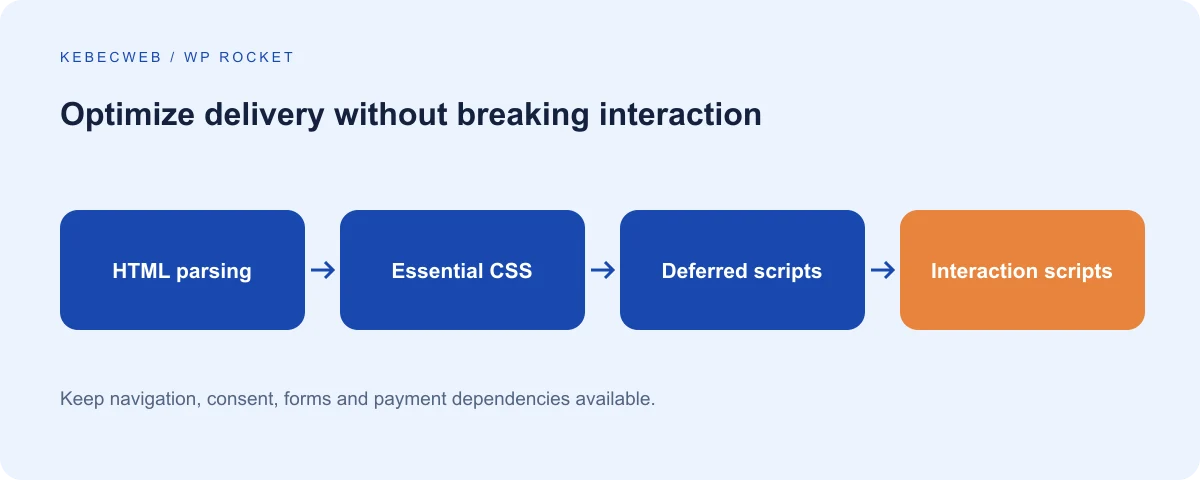
Deferred scripts can allow HTML parsing to continue while files download. This changes timing: inline code or another script may expect a library to exist immediately. The failure may appear as an undefined function or a control that never initializes. Defer does not remove the script's eventual CPU cost, and a large execution burst can still affect responsiveness.
Enable it on staging, inspect the console and test dependencies. A gallery, slider or form library must remain available when its initialization code runs. If an exception is needed, follow the supported exclusion mechanism and preserve the dependency chain. Load JavaScript deferred provides the current implementation details.
Delay JavaScript Execution
Delay postpones selected JavaScript until user interaction. It can help when a page loads heavy scripts that are not needed immediately, but it can also delay navigation, consent handling, chat, embedded forms and payment controls. A higher lab score is not a good trade if the customer's first tap fails or a necessary notice appears too late.
Test the first tap, not just the second. Reload the page, wait without touching it, then open the mobile menu. Repeat with keyboard navigation, a product variation, a consent choice and a form submission. Payment widgets require particular attention because they may load external dependencies and communicate with a gateway.
Use available compatibility exclusions first, then identify additional dependencies narrowly. Excluding a library but delaying its initialization script can still break the feature. Do not paste a universal list from an unrelated website. Consult Delay JavaScript Execution and its troubleshooting procedure, then keep only the exceptions your site needs.
Media: images, backgrounds, iframes and video
Lazy loading postpones off-screen media. Start with images below the initial viewport and verify galleries, sliders and page-builder backgrounds. Your main visible image should not wait for scrolling before it can load. Current WP Rocket versions perform automatic priority-element work, but verify that the correct hero image is recognized on both desktop and mobile.
Lazy loading CSS backgrounds is a distinct option because background images are discovered differently from ordinary image elements. Test sections that become visible after an accordion or slider transition. For iframes and video, verify that the embedded content loads when expected and that the consent system still controls it correctly.
Replacing a YouTube iframe with a preview can avoid loading the full player before interaction. Test the preview, its accessible label and playback on mobile. A preview is not a guarantee of privacy compliance; consent and third-party requests still need their own review. The official preview instructions explain the feature rather than promising it covers every embed.
Add missing image dimensions can help reserve space and reduce layout shifts. Check responsive cropping and aspect ratios, because explicit dimensions do not compensate for a theme that deliberately changes layout after loading. WP Rocket does not automatically compress your originals or convert your image library simply because LazyLoad is enabled. Use an appropriate image workflow and keep original assets recoverable.
Fonts and automatic priority elements
Font loading can delay text or cause it to move. The current font-preload feature analyzes fonts needed near the top of the page; it is not the old manual box that required a list of every font URL. More preloads are not inherently better. They compete with the hero image and other resources, so inspect the actual loading sequence.
Self-host Google Fonts can reduce reliance on remote font delivery for supported font references. It does not necessarily discover every font inserted dynamically by arbitrary scripts. Test weights, accented characters, italics and the builder's font settings after enabling it. Verify the resulting requests in the browser rather than assuming that the checkbox removes every external connection.
Automatic priority-element features can optimize critical images, font discovery and below-the-fold rendering. They require analysis and may differ between mobile and desktop. Do not judge the first cold visit immediately after activation as the final optimized state. Refer to priority elements, font preloading and self-hosted fonts for current requirements.
Preload Cache and Preload Links
Preload Cache generates eligible pages ahead of visits. Keep it if the server can sustain the work and scheduled tasks run reliably. A large sitemap, mass content import or frequent full purge can create significant background load. Monitor response time and resource use during rebuilding, and reduce avoidable purges before seeking a more aggressive preload configuration.
Preload Links anticipates navigation through link interaction. It is a separate feature from building all cached pages in the background. Evaluate it on your actual site, particularly where links trigger state changes or another product also predicts navigation. WP Rocket currently documents a conflict with Cloudflare Speed Brain; choose a compatible approach rather than enabling both reflexively.
The preload documentation describes discovery and scheduling. Sitemap URLs must be useful public destinations, not thousands of low-value combinations. Fix broken URLs and unnecessary parameter variants at their source. Preloading does not make private customer pages safe to cache.
Advanced Rules: lifespan and exclusions
Start with the documented ten-hour cache lifespan unless the site's behaviour gives a reason to change it. A shorter value increases regeneration; a longer value requires reliable invalidation. WordPress forms and other components may include expiring nonces, so preserving a page indefinitely can leave visitors with stale tokens. Do not enter zero simply because you want maximum speed: it disables the lifespan-driven purge.
Never Cache URLs identifies pages that must bypass page caching. Use it for custom private or highly dynamic routes not covered by automatic compatibility. Verify the actual permalink, language variant and relevant subroutes. Never Cache Cookies can prevent shared responses when a particular visitor state exists. Never Cache User Agents is available for exceptional cases, but broad device exclusions often reduce the benefit unnecessarily.
Always Purge URLs expresses a content dependency: a changed item also affects another page. Use it sparingly, because a large list increases rebuild work. Cache Query Strings tells WP Rocket which parameters represent separately cacheable content. Treat search terms, filters, account actions and tokens carefully. A tracking code is not automatically a content variant, and a checkout action must not become a public cache entry.
Review lifespan, page exclusions, cookie exclusions and query-string rules. If you are unsure about personalized content, ask Kebecweb support before broadening what can be cached.
Database cleanup
The Database section can remove selected revisions, auto-drafts, trashed posts, unwanted comments and transients, and offers database optimization and scheduling. Review each category before acting. Deleting revisions removes editorial history; clearing transients can temporarily increase work while plugins regenerate them. A backup and an agreed retention policy matter more than the size of a cleanup counter.
Start with a manual, targeted cleanup on staging and inspect the result. Do not schedule every available operation daily without evidence that it is useful. Large tables and order data require application-aware maintenance. WP Rocket's cleanup is not a reason to delete WooCommerce orders, sessions or custom plugin tables manually. See the database feature documentation.
Content Delivery
Current releases use the Content Delivery section for RocketCDN choices and another CDN's configuration. Select only the mode appropriate to your account. A separate CDN hostname may need to be entered for a conventional asset CDN. Cloudflare's normal reverse-proxy setup does not need its zone name entered as a CDN CNAME here.
Check HTTPS, resource availability, font cross-origin behaviour and any asset types excluded from rewriting. A CDN subscription and image optimization are distinct services; do not assume either is included in a WP Rocket licence or Kebecweb plan. Consult the current RocketCDN documentation when comparing free and paid offerings.
Heartbeat
WordPress Heartbeat supports periodic communication such as editor autosaving and post locking. WP Rocket offers controls for different contexts. Reducing unnecessary polling can be useful, particularly with many open administrator tabs, but disabling it everywhere can interfere with expected editor or plugin behaviour.
Keep essential editor functionality, test post locking with your normal editorial workflow and close unused tabs before blaming Heartbeat for server load. A busy WooCommerce task queue or an inefficient query needs a different remedy. Follow the Heartbeat API guidance rather than treating every background request as expendable.
Add-ons
User Cache is an explicit choice for logged-in users. Leave it off for a normal starting configuration, especially with customer accounts, membership entitlements or personalized pricing. If it is needed, validate how individual user responses are separated and invalidated. Background public preloading does not prove private-user caching works safely.
Varnish integration coordinates purging when a compatible Varnish layer actually exists. WebP compatibility concerns particular image-delivery methods; it does not generate WebP files. Cloudflare and Sucuri integrations coordinate supported external services and require their own account configuration. Enable an integration because that product is present and understood, not because its name sounds useful. See User Cache and the official add-on directory.
Tools, support and image-optimization links
Export a known-good settings file. Treat imports as configuration changes that need testing, not guaranteed profiles for any site. Version rollback, mobile-cache controls on eligible older installations and dynamic compatibility exclusions belong to operational maintenance. Safe Mode can reset optimization choices; preserve the offered export so you can recover your settings.
Where your version shows an optional MCP connection or other connected tooling, it is not required to achieve caching benefits. Grant access only through an understood account and authorization process. Image Optimization links may introduce another product rather than a built-in image compressor. Tutorials and vendor support links are useful references but do not replace your own functional tests.
| Setting group | Safe starting direction | Store or builder qualification |
|---|---|---|
| Public page cache | Verify automatic operation | Preserve private-page exclusions |
| CSS/JS minification | Keep if functional tests pass | Isolate broken assets individually |
| Remove Unused CSS | Trial on representative templates | Test hidden controls and validation states |
| JS defer/delay | Enable separately and measure | Test first interaction and payment dependencies |
| Lazy loading | Use below the initial viewport | Check galleries, variants and hero media |
| Preloading | Keep with resource monitoring | Avoid repeated full purges during imports |
| User Cache | Off unless explicitly justified | Requires a private-content audit |
| Database schedule | Off until retention is agreed | Never replace order-data maintenance |
5. Optimize WooCommerce without breaking sales
A store must show the correct product, price, stock and customer state before speed becomes useful. Incorrect caching can produce stale carts, incorrect customer information or checkout failures. If you suspect information from another account is being exposed, stop the unsafe cache rule immediately and investigate the scope. That is a correctness and privacy incident, not an acceptable temporary side effect of optimization.
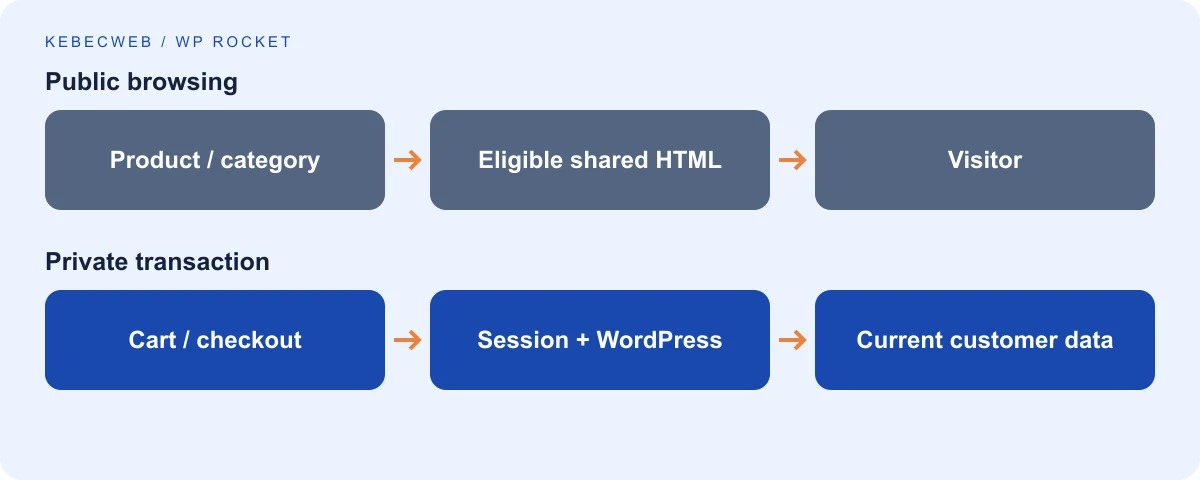
Public catalog versus private transactions
Public product and category pages are often excellent cache candidates. Cart, checkout and account pages are different: they depend on the visitor and current transaction. WP Rocket automatically recognizes the WooCommerce pages assigned in WooCommerce settings, but verify the assignments and custom equivalents. Translated, replacement or heavily customized checkout pages need explicit review.
A catalog page can still be personalized. Wholesale prices, membership discounts, currencies, tax location, wishlists and recently viewed products may change its content. A PHP-rendered personalized widget embedded in shared HTML can leak the first visitor's state to later visitors. Use an extension with a documented cache-compatible design or bypass caching for that state; do not assume that WooCommerce detection covers every add-on.
Sessions, cookies and dynamic fragments
WooCommerce uses session and cart cookies to associate visitors with the correct state. Important examples include woocommerce_items_in_cart, woocommerce_cart_hash and the wp_woocommerce_session_ family. These are signals to understand, not instructions to indiscriminately delete customer cookies. A CDN and a server cache must respect the same distinctions as the application.
A mini-cart can update through dynamic requests rather than shared HTML. Classic fragments, blocks and third-party cart implementations do not all behave identically. WP Rocket includes compatibility work for classic refreshed fragments, but a custom widget can still fail. Inspect the actual implementation and requests before disabling fragments globally. Removing the update mechanism may make a score look better while leaving the cart wrong.
Payments and subscriptions
Payment controls can depend on external JavaScript, redirects, API requests, webhooks and authentication flows. Delay or minification problems may prevent the gateway from initializing even when the checkout page itself is not cached. Keep necessary dependencies in the correct order and test error messages, cancellation and return journeys in the provider's test mode.
WooCommerce Subscriptions adds recurring billing and scheduled processing. Page caching does not perform renewals or repair failed background actions. Check the compatible gateway, tokenization, scheduled actions and webhook delivery separately. Do not use a successful initial purchase as proof that an automatic renewal will work. Consult the subscriptions guide alongside the payment provider's documentation.
A repeatable checkout acceptance test
- Use staging and a gateway sandbox; confirm that real charges, stock changes and customer emails are appropriately isolated.
- In a new guest session, select a simple product and a variable product. Confirm that selection, price and availability update correctly.
- Add, remove and change quantities. Check both the mini-cart and full cart, then reload and navigate back.
- Apply a valid and an invalid coupon. Change shipping country or postal code and verify available methods and taxes against your test scenario.
- Complete the test checkout. Verify the order record, expected status, gateway result and transactional email.
- Repeat while logged in and in another separate customer session. Check that one customer's cart and details never appear in the other.
- Test a declined payment, abandoned return and any subscription flow used by your store. Review logs without exposing payment or personal data.
- Repeat after enabling each aggressive optimization and after a significant theme, gateway or WooCommerce update.
Do not perform live paid test orders without a deliberate testing arrangement. If checkout fails, disable the last front-end optimization, purge affected assets and compare the same sandbox scenario. Use checkout troubleshooting, WooCommerce performance and open a technical ticket with the URL, time, browser and sanitized error details.
Stock changes, imports and uncached speed
Updating products normally triggers related invalidation. Large imports and products assigned to many categories can cause extensive purge and rebuild work. Schedule bulk changes thoughtfully, monitor queues and verify that customers receive current stock after updates. Avoid turning off all product purging just to reduce CPU without replacing it with a reliable freshness strategy.
An uncached checkout still needs adequate PHP workers, efficient queries and responsive external services. Redis, database tuning or better hosting may help after profiling, but they are not automatic remedies for a gateway outage. Compare WooCommerce hosting and VPS hosting when resource evidence supports the decision, rather than using a page-cache setting to disguise a transactional bottleneck.
6. Use WP Rocket and Cloudflare together
Cloudflare can deliver cached resources from an edge location closer to the visitor while WP Rocket prepares and optimizes eligible responses at the origin. Ordinary proxied Cloudflare delivery is not the same as full-page HTML caching. APO and custom Cache Rules can change what happens to HTML, so record which configuration you actually use before choosing purge and exclusion settings.
Separate the layers
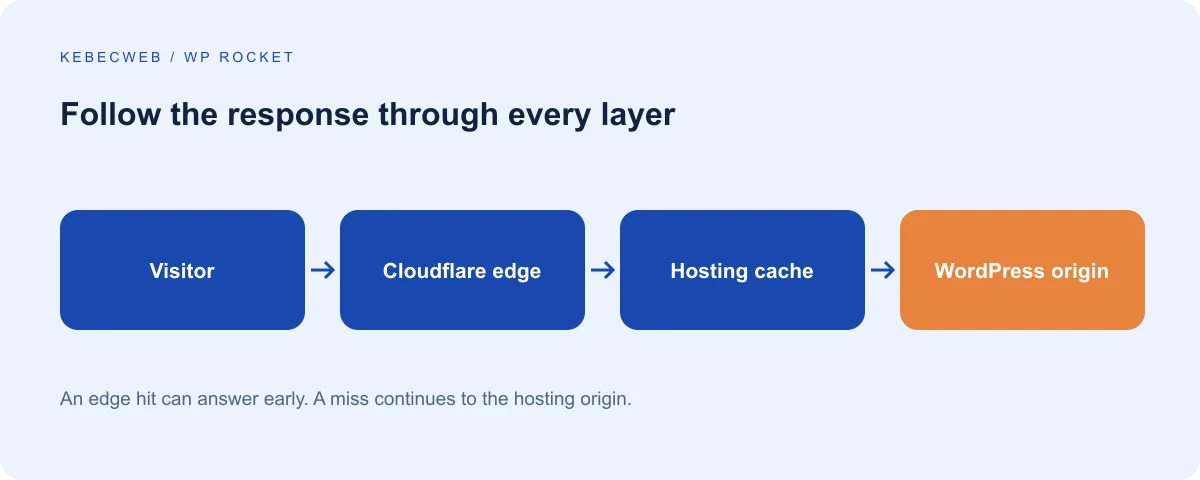
For a typical request, the browser reaches Cloudflare first. If Cloudflare has an eligible cached response, it can answer there. Otherwise it asks the hosting server, where a server cache or WP Rocket may answer, or WordPress may generate the page. Clearing the origin alone does not necessarily remove a saved edge response. Clearing the edge alone can still fetch an outdated origin response.
After a substantive update, follow the integrations' documented purge order and confirm the result from an anonymous session. With generated assets, also ensure the HTML references the new versioned files. Avoid routine “purge everything” actions when a targeted purge can do the job. A full purge during peak traffic can send a sudden burst of misses back to the hosting server.
Standard CDN, APO and Cache Rules
A normal Cloudflare proxy does not require a CDN CNAME in WP Rocket's Content Delivery settings. The WP Rocket Cloudflare add-on is optional for supported coordination tasks and needs the account details the current integration actually accepts. Protect API credentials and confirm permission requirements rather than assuming a generic token will fit every integration.
APO adds WordPress-aware edge HTML caching. Its official WordPress plugin handles integration and purging. WP Rocket's documented APO behaviour differs from its standalone Cloudflare add-on; do not combine contradictory instructions from older tutorials. Cache Rules are also different from the legacy Page Rules examples often found online. If you create HTML cache rules, review authentication, cookies, private paths, methods and query parameters explicitly.
Read WP Rocket's Cloudflare guidance and Cloudflare's APO behaviour. Use the documented integration for your actual setup. Do not apply “Cache Everything” to an entire commerce site without safe bypass rules and session testing.
Overlapping optimizations and security
Choose one owner for JavaScript transformations. Cloudflare Rocket Loader can change script behaviour independently of WP Rocket; disable that transformation during diagnosis if scripts break. Cloudflare Speed Brain and WP Rocket Preload Links have a documented incompatibility. More speculative loading is not automatically better, especially if it increases origin work or triggers errors.
Use HTTPS end to end with an appropriate origin certificate and Cloudflare Full (strict) configuration where applicable. Do not solve mixed content by teaching the browser to accept an insecure origin. A certificate, redirect and application-URL problem should be corrected at its source. See HTTPS troubleshooting if visitors encounter redirect loops or insecure assets.
Security challenges may block preload or external CSS analysis. Establish targeted exceptions for verified vendor traffic with the hosting or security administrator. Do not disable the entire firewall or bot protection simply to remove a warning. If the integration remains unclear, ask support to review the cache layers, including your Cloudflare mode and the exact URLs involved.
7. Improve the server and application beyond WP Rocket
A page-cache hit can conceal inefficient application code, but checkout, administration, search and cache misses still expose it. Investigate these paths directly. The WordPress performance handbook provides useful background, although historical advice should always be checked against the current software stack.
PHP version and memory
Use a supported PHP version compatible with your WordPress release, theme and plugins. Test an upgrade on staging and review logs and scheduled tasks before switching production. A newer version can improve performance, but compatibility and security maintenance are the first requirements. Never guess the site's PHP version from the appearance of its control panel.
The memory limit controls the maximum memory a PHP process can use; it does not reserve that amount or guarantee faster execution. An exhausted process needs diagnosis and sometimes a higher allowance. Raising the ceiling excessively can increase the damage of many simultaneous heavy requests. Follow the WordPress memory guide, compare the application request with the hosting limit, and identify the plugin or operation causing the peak.
OPcache and persistent objects
Ask whether OPcache is enabled and adequately sized for the installation. On a VPS, its configuration belongs in a broader capacity plan alongside PHP workers and available RAM. Do not allocate all memory to PHP and leave the database or operating system under pressure. Swap activity and process queues can produce slow responses even when a single test request succeeds.
Redis or Memcached can reduce repeated data retrieval when integrated correctly. Use a compatible persistent-object-cache implementation, unique namespaces and an agreed eviction policy. Test correctness after updating prices, permissions and content. Never expose a cache service publicly without a secure architecture. Request a server review before assuming these services are available on your hosting plan.
Database and MySQL/MariaDB
Look for slow queries, excessive autoloaded options, missing indexes in custom tables and plugins that repeat expensive operations. A smaller database is not necessarily a faster database, and a large order table is not automatically a problem. The query pattern, indexes, working set and available buffers matter. An administrator should profile representative requests before changing global database settings.
Do not follow old advice that universally recommends MySQL's query cache: modern MySQL removed it, and MariaDB behaviour varies. Avoid deleting rows or changing indexes by trial and error on production. Use application-supported retention and cleanup mechanisms, back up first and schedule maintenance with the expected lock and workload behaviour in mind.
Images, WebP and AVIF
Resize images to the sizes actually displayed, provide responsive variants and compress them appropriately. WebP and AVIF can reduce transfer size, but retain suitable fallbacks and verify transparency, text legibility and colour. Converting a huge image without resizing it may leave unnecessary bytes. Inspect the actual selected source on a phone rather than only the original media-library file.
Keep meaningful alt text for informative images and avoid keyword stuffing. Decorative images can use an empty alternative. Reserve dimensions, prioritize the principal visible image and lazy-load images farther down. If a product zoom needs a high-resolution original, serve a smaller initial preview without removing the detailed version customers need.
CPU limits, workers and traffic
Measure peak periods and distinguish traffic volume from concurrency. A large number of simple cache hits may use fewer resources than a small number of expensive searches. Check whether PHP workers queue, CPU reaches an account limit, memory is exhausted or disk operations stall. Resource evidence should guide changes to a plan or server.
A VPS provides a different level of control and capacity planning, not automatic speed. It still requires maintenance, monitoring and application optimization. Compare WordPress hosting and VPS options, then use the upgrade guide to decide whether your workload actually justifies a move.
Delivery protocols and compression
HTTP/2 and HTTP/3 can improve how resources travel, but they do not fix slow database generation. GZIP and Brotli reduce text-resource transfer size where configured. Verify the negotiated protocol and Content-Encoding in the browser instead of treating a plugin checkbox as proof of server behaviour. Already compressed images usually benefit little from an additional generic compression layer.
Avoid stacking incompatible server rewrite rules. A hosting administrator should manage server compression and protocol support. WP Rocket's generated rules and automatic features depend on the server environment; not every platform allows the plugin to implement them in the same way. A correct response is more important than chasing a particular label in an audit.
Cron, background jobs and plugin quality
WordPress scheduled work is often triggered through site visits. A reliable server schedule may be appropriate, especially when cached traffic reduces normal PHP execution. Configure the replacement before disabling the visit-triggered mechanism. WooCommerce scheduled actions, emails, backups and cache processing need dependable execution, not merely a setting that says cron is disabled.
Look at overdue actions and recurring failures. A payment retry queue needs attention to its cause; deleting the queue is not a repair. Heavy backups and imports can compete with preload. Schedule them deliberately and monitor their duration. For an ongoing issue, provide support with sanitized timestamps and task names rather than credentials or customer records.
Plugin count alone is a poor performance metric. One plugin with expensive queries or a large front-end bundle can cost more than several focused plugins. Remove unused functionality, profile the remaining workload and avoid globally loading assets needed on only one page. A slow theme, builder widgets and third-party scripts also deserve review. Reduce unnecessary trackers and embeds before adding another optimization plugin.
8. Measure performance and prove improvements
Choose a practical question: is the server slow, is the visible content delayed, or does the page fail to respond promptly? A composite score can point you toward work, but it is not the answer by itself. Keep functionality, accessibility and privacy in the acceptance criteria alongside speed.
Establish comparable tests
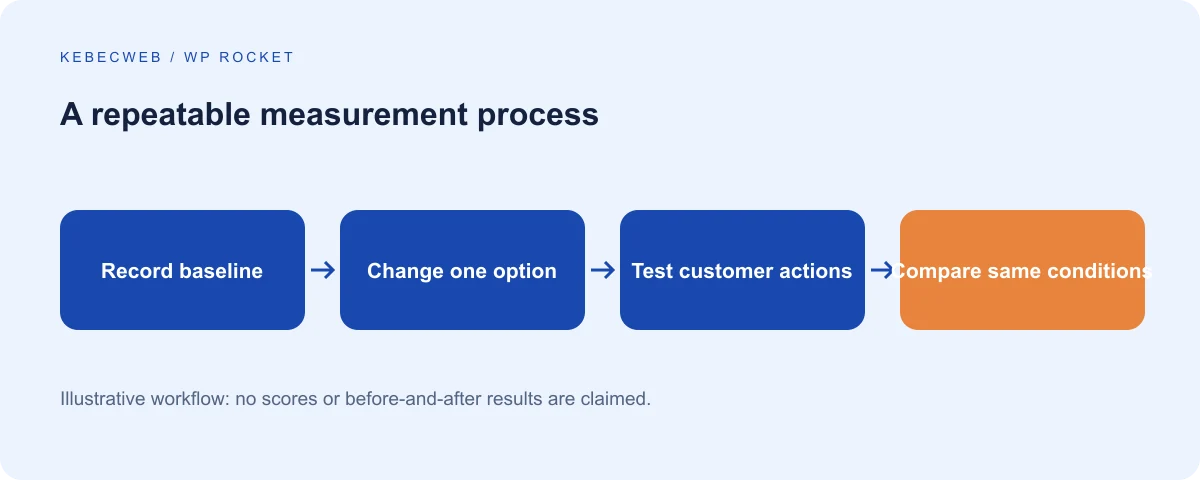
Select representative pages and record the URL, device, test location, network conditions, login state and cache state. Separate a first cold request from warmed page-cache tests and from repeat-browser visits. Run several comparable samples and use a median rather than selecting the fastest result. Save the report and settings version so a future regression has a reference.
Change one option, allow processing to finish, repeat the test and inspect what changed. If results vary widely, investigate the testing conditions or server load before declaring a winner. Do not repeatedly purge every cache between tests of the normal warmed experience. Include a cold-cache sample separately when resilience after a purge is part of the question.
PageSpeed Insights
Open PageSpeed Insights and enter the public page URL. Review mobile and desktop separately. First distinguish real-user data from the laboratory report. Field data reflects eligible Chrome users over a rolling period, usually 28 days, and may be unavailable for a small site or a particular URL. Origin-level data is broader than a single page.
Then inspect the lab diagnostics and identified LCP element. A lab improvement can appear immediately while field data takes time to reflect changed experiences. A missing field report is not proof that the page passes Core Web Vitals. Google's PSI explanation describes the difference and limitations.
Lighthouse and GTmetrix
Lighthouse in Chrome can audit a page under controlled local conditions. Use a consistent browser profile, avoid extensions affecting the test and record the selected device and throttling mode. An audit of your authenticated administrator session is not comparable with a public PageSpeed test. Examine the opportunities and diagnostics instead of assuming every suggestion has equal impact.
GTmetrix provides another useful lab workflow with reports and a request waterfall. Record the location, browser and connection settings available to your account. Do not compare a GTmetrix result from one location directly with an unrelated PSI mobile run as if the difference came from WP Rocket. Look for large files, delayed resources and long server waits in each tool's own consistent series.
Chrome DevTools
Open DevTools and use Network to inspect the main document and subsequent assets. The timing details help distinguish waiting for the first response from downloading a large file. Check status codes, redirects, cache indicators and duplicate resources. Disabling the browser cache in DevTools does not automatically disable WP Rocket, Cloudflare or a server cache.
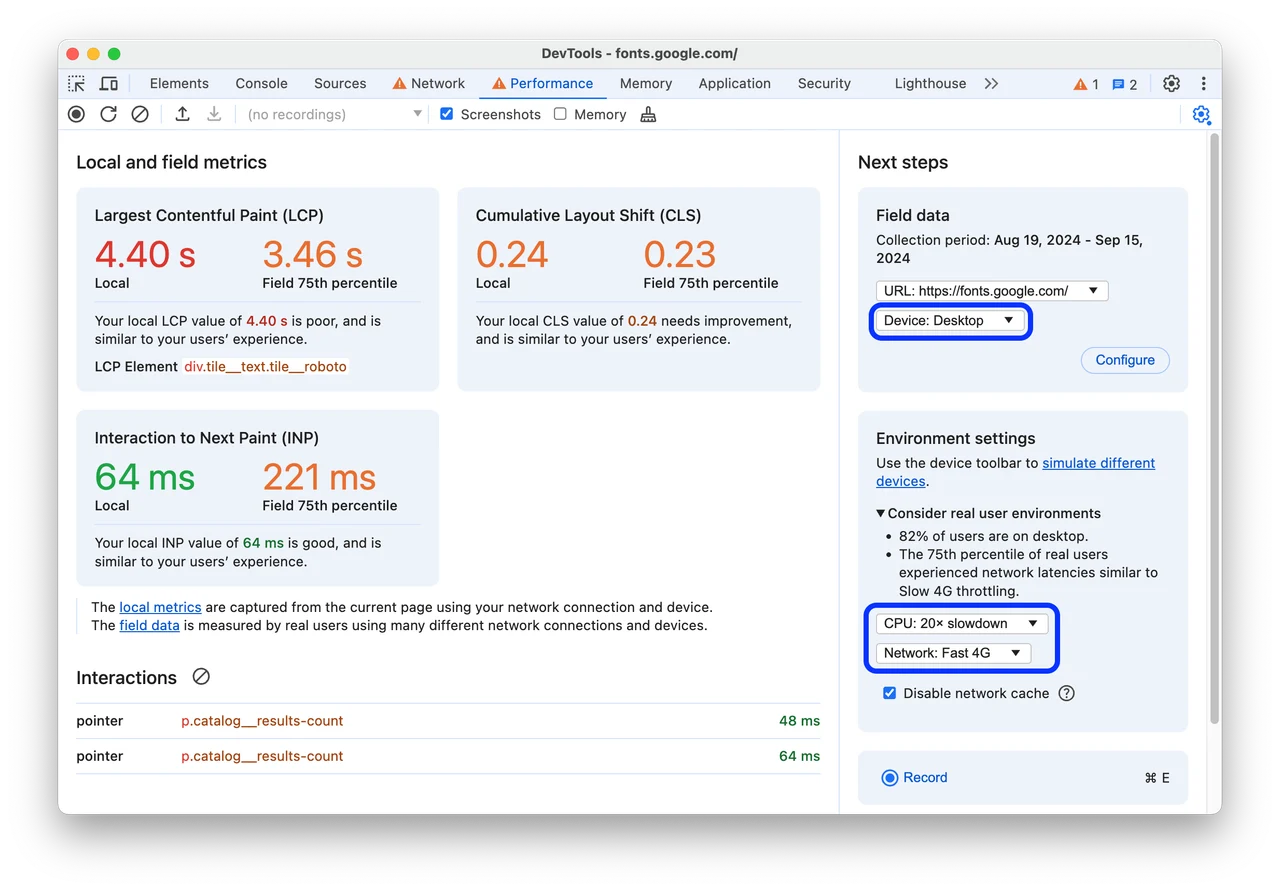
Use Performance to record a reload and then real interactions: opening the menu, choosing a product variation or submitting a test form. Inspect long tasks, layout shifts and delayed input handling. Local measurements reflect that device and session. The official Performance panel guide explains recording and field-data comparison.
Understand the metrics
| Metric | Meaning | Practical interpretation |
|---|---|---|
| LCP | When the largest eligible visible content appears | Investigate the hero resource, server response and rendering |
| INP | Responsiveness across qualifying interactions | Test actual controls and long JavaScript tasks |
| CLS | Unexpected visual movement | Reserve space and avoid late disruptive insertion |
| TTFB | Time until the first response byte | Diagnose redirects, network, cache and origin work |
| FCP | First visible text or image content | An early signal, not completion of the main content |
| TBT | Lab blocking time during loading | A useful diagnostic, not a replacement for field INP |
Good Core Web Vitals thresholds are LCP at or below 2.5 seconds, INP at or below 200 milliseconds and CLS at or below 0.1, assessed at the 75th percentile. They are not a promise for every visitor. TTFB and FCP are valuable supporting metrics but are not the three Core Web Vitals. Read the threshold definitions.
An illustrative investigation, not invented results
Suppose a report identifies a large hero image as the LCP element. First inspect its actual dimensions and transfer size. Create an appropriately sized alternative, preserve its visual quality, remove inappropriate lazy loading and retest under the same conditions. If LCP remains dominated by server waiting, investigate origin work rather than compressing the image repeatedly.
For a sluggish menu, record the first tap and inspect the main thread. If enabling delayed JavaScript improves loading diagnostics but postpones the menu initialization, exclude that necessary dependency or reconsider delay for the page. The correct outcome is an early usable menu and a defensible measurement, not a fabricated before-and-after percentage.
Google uses page experience within a broader search system; a perfect Lighthouse score does not guarantee ranking. Keep useful content, crawlability, appropriate titles and working links. Refer to Google's page-experience guidance and treat performance as customer experience as well as technical SEO.
9. Troubleshoot problems safely
Use a recoverable staging copy whenever possible. Export current settings before a reset and keep a file-and-database backup. Compare the affected URL with WP Rocket's diagnostic ?nowprocket parameter, or &nowprocket if the URL already has a query string. This bypass helps isolate many WP Rocket front-end transformations, but it does not bypass every CDN, server, browser or background change. See the documented scope.
1. The website breaks after optimization
Symptoms: multiple pages lose formatting or controls after saving settings. Likely causes: several transformations were enabled together or an overlapping plugin still owns the same assets. Diagnosis: restore the previous configuration, purge affected assets and compare one option at a time. Resolution: retain the last functional baseline and isolate the responsible transformation. If necessary, use Safe Mode with its settings export. Contact support if administration is inaccessible or recovery requires filesystem changes.
2. CSS layout problems
Symptoms: missing spacing, invisible controls or a broken mobile layout. Likely causes: removed dynamic selectors, stale builder CSS or minification incompatibility. Diagnosis: compare with Remove Unused CSS off, then test minification separately. Resolution: regenerate builder assets through its supported tools and use a precise safelist when a state-dependent rule is missing. Ask support when the failure spans multiple templates or generated CSS cannot complete.
3. JavaScript errors
Symptoms: an undefined function, stalled widget or console exception. Likely causes: dependencies run in the wrong order or a transformed file fails to load. Diagnosis: note the first meaningful error and its file, then disable delay, defer and minification separately. Resolution: exclude the complete necessary dependency chain narrowly. Escalate with a sanitized console error and reproduction steps; do not paste private tokens from requests.
4. The mobile menu does not work
Symptoms: the first tap does nothing or the drawer opens without styles. Likely causes: delayed initialization or missing menu-state CSS. Diagnosis: reload without interaction, then test the first tap with delay off and CSS optimization off separately. Resolution: preserve essential navigation dependencies and safelist required menu states. Contact support if the issue depends on a particular device or persists without optimization.
5. Contact forms do not submit
Symptoms: endless loading, missing CAPTCHA or token-validation errors. Likely causes: delayed form scripts, stale nonces or blocked external requests. Diagnosis: test a controlled submission on staging, inspect the request and compare the unoptimized page. Resolution: repair script timing and token freshness; do not remove validation or anti-spam controls. Ask support with the failure time and sanitized response, never a customer's message contents.
6. Checkout fails
Symptoms: a missing gateway, spinning payment section or rejected checkout. Likely causes: transformed payment scripts, incorrect private-page caching or an unrelated gateway failure. Diagnosis: use sandbox payments, confirm the assigned checkout page and compare with the last optimization disabled. Resolution: preserve exclusions and gateway dependencies, then retest the entire transaction. Escalate promptly if production sales are affected; do not troubleshoot through repeated real charges.
7. The cart does not update
Symptoms: wrong count, stale products or quantities that revert. Likely causes: cached custom mini-cart HTML, failed fragments or session mishandling at another layer. Diagnosis: compare two isolated sessions and inspect dynamic requests after changing quantity. Resolution: use a cache-compatible widget and consistent bypass rules. Never accept cross-customer state as a cosmetic issue. Ask support if you cannot determine which layer retains the response.
8. Images do not load
Symptoms: blank placeholders, missing backgrounds or broken CDN URLs. Likely causes: conflicting lazy loaders, generated URL errors or blocked resources. Diagnosis: inspect the failed request and test with one lazy-loading implementation disabled. Resolution: fix the URL or exclusion and ensure above-the-fold images load promptly. Escalate when permissions, origin access or conversion delivery is responsible rather than a front-end setting.
9. Sliders and animations malfunction
Symptoms: frozen slides, jumping content or missing controls. Likely causes: delayed libraries, initialization order or removed state styles. Diagnosis: test the first load, keyboard controls and touch with transformations disabled separately. Resolution: preserve the essential scripts and accessible states, or simplify a component that needs excessive work. Contact support if a builder update changed generated assets or the problem only appears after cache warming.
10. Logged-in users see stale content
Symptoms: old account information or permissions after an update. Likely causes: inappropriate User Cache, an edge rule or incorrect object invalidation. Diagnosis: compare public and authenticated responses and inspect every cache layer. Resolution: bypass private content and repair invalidation; do not simply lengthen expiry. Stop the unsafe rule immediately if one account sees another's details, then ask support to investigate scope and cause.
11. Cloudflare serves an old page
Symptoms: the origin is fresh but the public response is not. Likely causes: edge HTML caching or incomplete purge integration. Diagnosis: inspect Cloudflare indicators and compare the documented origin/edge behaviour with your administrator. Resolution: coordinate purging and correct rule ownership. Avoid repeated full purges as a permanent fix. Ask support when an APO or Cache Rules setup is unclear.
12. WP Rocket does not generate cache
Symptoms: eligible pages have no cache files or preload stalls. Likely causes: a hosting-native integration, exclusions, authentication, permissions or failed scheduled tasks. Diagnosis: establish whether WP Rocket is expected to own page caching, then inspect an anonymous public page and task notices. Resolution: fix the specific integration or scheduling issue without weakening security. Escalate with the hosting environment and URL rather than making directories broadly writable.
13. Scores do not improve
Symptoms: the grade barely changes although caching appears active. Likely causes: the bottleneck is images, JavaScript or third parties; processing is unfinished; or test conditions differ. Diagnosis: compare detailed waterfalls and metrics with the same cache state. Resolution: target the dominant cost and retain useful functional improvements. Ask for a performance investigation when you cannot separate server waiting from browser work.
14. Preloading uses too much CPU
Symptoms: rebuilds coincide with slow responses or resource limits. Likely causes: huge URL sets, repeated global purges, short lifespan or slow uncached generation. Diagnosis: correlate resource graphs with imports, backups and purge events. Resolution: reduce unnecessary invalidation and schedule heavy work; adjust preload only through documented controls. Ask support before increasing concurrency or account limits, and provide the relevant timestamps.
15. Another optimization plugin conflicts
Symptoms: duplicate transformations, alternating assets or unexplained cache behaviour. Likely causes: several tools own minification, lazy loading or page cache. Diagnosis: inventory ownership and disable overlaps on staging, one at a time. Resolution: choose one implementation for each job and follow removal instructions for leftovers. Escalate if drop-ins or server rules require review; never delete unfamiliar files blindly.
What to include in a technical ticket
Provide the affected URL, exact time and timezone, plugin versions, cache layers, last change, browser/device and a short reproduction procedure. Attach sanitized screenshots or logs and identify whether the issue occurs on staging, production or both. Do not include passwords, API secrets, session cookies or payment details. Open a Kebecweb technical support request; the customer portal handles access and the appropriate request process.
10. Choose a configuration profile and maintain it
Profiles describe priorities, not imported universal settings. Begin with the functional baseline, apply each optimization separately and save the result with its tested versions. Revisit it after a redesign, gateway update or change to CDN behaviour. The best profile is one your team understands well enough to maintain.
Small business website
Keep public page caching, compatible minification and sensible below-the-fold lazy loading. Trial CSS optimization against the homepage and contact page before adding JavaScript delay. Prioritize an immediately usable menu, a working contact form and a correctly loaded hero image. Preload is usually useful if the small URL set and server resources support it. Keep User Cache off unless a real authenticated feature requires a separate audit.
Blog or publication
Focus on article templates, archive pages and content freshness after publication. Check that updates refresh the homepage, relevant categories and feeds as intended. Review ad scripts, embeds and large images individually; they can dominate browser work even when HTML is cached. Preserve useful editorial revisions rather than automatically deleting them every day. Monitor preload after bulk imports and avoid generating unnecessary parameter variants.
WooCommerce store
Cache eligible public catalog pages and retain private-route exclusions. Test prices, variations, taxes, carts and gateways before approving defer, delay or CSS removal. Keep User Cache off as the starting point. Profile uncached checkout and scheduled actions separately. Choose WooCommerce hosting or a reviewed upgrade based on actual dynamic workload, not the public homepage score alone.
High-traffic WordPress website
Measure concurrency, hit rate and uncached generation time. Coordinate origin and edge invalidation, warm important pages and monitor the surge following a purge. Persistent objects, database analysis and adequate workers may matter as much as front-end transformations. Define who can trigger a global purge during a campaign. A traffic spike is a capacity event, so test failure recovery and monitoring as well as the normal fast path.
WordPress behind Cloudflare
Identify ordinary asset caching, APO or custom HTML rules explicitly. Keep one owner for script transformations and avoid the documented Speed Brain/Preload Links conflict. Verify private-page bypass and correct purge propagation. Use suitable origin TLS and inspect the edge response from a separate visitor session. Do not add a CDN hostname simply because the site uses Cloudflare's proxy.
WordPress on a VPS
Treat WP Rocket as one layer of an operated server. Verify supported PHP, OPcache, workers, database capacity, persistent-object availability and scheduled tasks. Size these against total RAM and workload, not isolated maximum values. Monitor storage growth and backup recovery. A VPS is appropriate when control or sustained resources are needed, but its maintenance and service scope must be agreed. Ask for a capacity review before assuming a new server solves an application bottleneck.
A practical maintenance routine
Keep an owner for the configuration, an export of the last accepted settings and a repeatable test list. After major updates, test public browsing and customer actions, then review comparable performance samples. Check scheduled-task failures and resource limits during ordinary traffic and busy periods. Retire exclusions that no longer serve a demonstrated purpose, but test their removal rather than deleting them all at once.
When an improvement fails acceptance testing, revert it and record why. A slightly lower score with dependable navigation and checkout is a better result than a technically impressive report hiding broken transactions. Use the related guides for a narrower procedure, or request assistance when diagnosis crosses application, CDN and server boundaries. Optimization is an ongoing maintenance practice, not a one-time collection of enabled switches.
Frequently asked questions
Is WP Rocket included with Kebecweb hosting?
A hosting plan does not automatically provide a WP Rocket licence or unlimited installation and tuning work. Purchase through the official publisher or confirm the proposed service with Kebecweb. If you need help, describe the site and the intended work in a technical request so the scope can be established before access or configuration changes.
Will WP Rocket always outperform a free plugin?
No. The server stack, site behaviour and configuration determine the result. A compatible hosting-native cache or LiteSpeed configuration can be a better fit in some environments. Compare the same URLs under consistent conditions and include functionality and maintenance effort in the decision, rather than treating a paid licence as proof of a faster website.
Why can I no longer find the Cache tab?
The current interface moved cache lifespan to Advanced Rules and user caching to Add-ons. Mobile caching is automatic for new installations; eligible older installations can expose activation under Tools. Follow the instructions for your installed release rather than trying to restore a tab from an old tutorial.
Can I use two page-caching plugins together?
Avoid assigning the same job to two plugins. They can create conflicting files, rules and invalidation behaviour. Complementary layers such as OPcache, persistent objects and a coordinated CDN are different, but their ownership still needs to be documented. Disable overlapping functions safely and follow the former plugin’s removal procedure.
Does caching work for a first-time visitor?
An eligible public page can be served from an existing page cache even when the visitor has never been there before. Browser caching normally helps subsequent resource requests on that device. Preloading can prepare page-cache entries in advance, but the request must still match the eligibility and variation rules.
Should I cache customer accounts?
Keep private account pages outside shared page caching. User Cache requires a specific review of per-user separation, permissions and invalidation; it is not a default recommendation for stores. Test with isolated accounts and every cache layer. If information crosses account boundaries, stop the unsafe rule and investigate immediately.
Does WP Rocket automatically protect WooCommerce checkout?
It detects the assigned WooCommerce private pages, but you must verify assignments and customized equivalents. A CDN rule can still override safe origin behaviour, and JavaScript transformations can break a payment widget without caching the checkout HTML. Validate the complete sandbox transaction and all relevant visitor states.
Can caching cause incorrect prices?
Yes, if personalized prices are generated into shared HTML without a compatible variation or dynamic-update strategy. Currency, location and membership rules deserve explicit testing. Use the pricing extension’s documented compatibility, suitable bypass rules or a supported dynamic implementation rather than assuming all catalog pages are identical.
Should I enable every JavaScript option?
Enable and test separately. Minification changes size, defer changes timing and delay waits for interaction. They address different costs and can affect dependencies. A menu, consent tool or gateway must remain usable on the first interaction. Keep only transformations whose measured benefit survives the full functional test.
Why is Remove Unused CSS still processing?
Its external analysis and scheduled work need time and suitable access. Check licence status, reachability, task execution and the reported error. Protected staging can legitimately prevent analysis. Establish targeted access with the administrator instead of removing security globally, and do not judge an unfinished generated stylesheet as the final result.
Does WP Rocket compress images or create AVIF files?
Lazy loading and priority handling are not image compression or format conversion. Use a suitable image workflow for resizing, compression and WebP or AVIF delivery. Verify selected responsive sources and fallback behaviour. WP Rocket’s WebP compatibility setting concerns particular delivery arrangements, not automatic conversion of the entire media library.
Can I use WP Rocket with Cloudflare?
Yes, when the two layers have compatible responsibilities and purge behaviour. Identify standard asset caching, APO or custom HTML rules first. Follow the current integration instructions and private-content exclusions. Do not add a CDN CNAME solely because Cloudflare proxies the domain, or stack conflicting speculative navigation and script transformations.
Will clearing WP Rocket also clear every other cache?
Not necessarily. The browser, server, edge, object cache and generated CSS can have separate lifecycles. A supported integration may coordinate some purges, but verify its scope. Identify which response is stale, clear that layer through its documented mechanism and confirm the result rather than routinely deleting unrelated cache directories.
Should cache lifespan be extremely short?
A shorter lifespan can refresh pages more often but increases rebuilding and preload work. It does not replace correct invalidation after content changes. Start with the documented default and review nonce freshness, shared content and resource capacity before changing it. Frequent dynamic updates may need a different component design.
Why is administration still slow?
Public page caching usually does not eliminate WordPress administration work. Investigate queries, plugins, external calls, background jobs, PHP workers and memory pressure. Persistent objects or server improvements may help when the evidence supports them. A fast anonymous homepage cannot establish that editing and order processing are adequately resourced.
Does increasing PHP memory make WordPress faster?
Not by itself. The limit is a ceiling, not a speed setting or reserved allocation. It can resolve a legitimate exhaustion problem, but the underlying workload still matters. Compare the application need with hosting limits and avoid creating memory pressure under concurrency by assigning excessive per-process ceilings.
Do I need Redis?
Consider it when repeated application data retrieval is a demonstrated bottleneck, especially on uncached paths. It requires a supported service and integration with safe isolation and invalidation. It is not mandatory for every small site and does not replace efficient SQL or a page cache. Confirm availability and scope with the hosting team.
Why does PageSpeed show different scores each time?
Network conditions, load, test location, cache state and background processing can vary. Keep a repeatable setup, run several samples and inspect the median and detailed timings. Field data is also distinct from a single lab run. Do not report the best isolated score as a guarantee of every customer’s experience.
Does a score of 100 guarantee better Google rankings?
No. Performance contributes to page experience, while search evaluates many other signals and the usefulness of content. Focus on real responsiveness and reliable customer actions, and keep crawlability and metadata correct. A broken checkout or inaccessible menu is not an acceptable trade for a perfect laboratory score.
When should I ask about VPS hosting?
Ask when sustained concurrency, uncached workload or required server control exceeds the current environment, supported by measurements. A VPS still needs maintenance and tuning. Share peak-resource evidence and slow-path examples so the recommendation can distinguish capacity limits from inefficient code or an external-service problem.
Related service
WordPress hostingOfficial documentation
Labels and options vary with versions, plugins and your account. Refer to publisher documentation for your configuration.